
Just went through a 24-hour ordeal that wasn’t easy to Google and find a solution for, so I’m going to leave this here for posterity’s sake.
**THE ISSUE**
My brand new PS4 Pro was having an issue where each time it woke up from sleep, or rebooted, the WIFI would disconnect. It could be solved by reconnecting to the WIFI, but that was a pain in the ass to do every single time.
**Note:** This did *not* have to do with the setting to keep WIFI enabled during sleep. That was on, and this issue was still happening. In fact, the issue was preventing that feature from working…
Googling around, I found a lot of suggestions that didn’t help such as “use an ethernet cord”, which I can’t do because of the distance from the router to the PS4 — I actually have to use an WIFI extender. Other advice was “you need to forward the ports or trigger the ports” for PS4. While some of those pointers actually helped improve my download / upload speeds, it had nothing to do with this issue of the WIFI disconnecting each time the PS4 woke up or rebooted.
I called my internet service provider and Playstation’s tech support, but neither knew what was up. I finally found an article on Google with a solution that worked and was actually super simple, so here it is:
**THE SOLUTION**
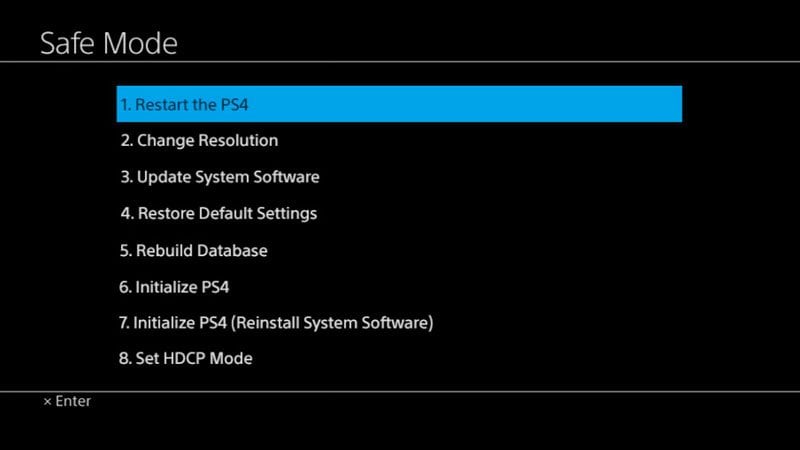
1) [Start the PS4 in safe mode](https://support.us.playstation.com/articles/en_US/KC_Article/Safe-Mode-PS4)
2) Rebuild the PS4 database. It says it may take hours, but it took about 5 minutes. According to the docs, rebuilding the database does *not* erase your data or your settings.
3) Rejoice!
After that was done, I tried a number of tests such as shutting the PS4 Pro down, rebooting it, putting it to sleep, etc. In every case, it would load up with the WIFI still connected. Hallelujah! Hopefully this helps someone else who runs into this weird, poorly documented scenario.
**Edit 1:** Wanted to add that while the docs say that settings and data won’t be affected (and mine were not after doing this several times), if you wanted to be 100% safe, you could run a backup before trying it.
**Edit 2:** I learned that certain WIFI extenders don’t work reliably with a PS4 Pro. For example, I had a NETGEAR Nighthawk extender on my normal PS4, and it worked fine for 2.4GHz, but when I switched to PS4 Pro and tried to use 5G it always timed out trying to connect to the network. That made fixing this WIFI issue really confusing! If you use an extender, and you try the DB fix, and the WIFI still disconnects after a reboot (or times out in general), it may be the extender. Try switching to 2.4GHz, or try another extender. Old school seems to be more compatible.
**Edit 3:** Someone asked what to do if WIFI still doesn’t work after all of this troubleshooting. The only remaining test I can think of is running a long ass ethernet cable directly from the router into the PS4. Assuming you can then get an internet connection I’d start in safe mode, reinstall a fresh copy of the latest firmware, reboot again in safe mode, rebuild the DB again, and see if WIFI comes back. If Ethernet doesn’t work or you still have no WIFI then it’s likely a hardware issue, which means take ‘er into the shop. Good luck!