
Hi guys, I’m sure y’all have been looking for an eq for this extremely expensive pair of headphones, or might have just picked them up from Amazon or a retailer for a sweet deal due to the discounts that have been going on recently. Sound is subjective and some might think the headphones sound great out of the box, however, most users have complaints about how the headphones severely lack bass as well as clarity, which is due to the horrible factory eq tuning done by Bang and Olufsen, somehow managing to mess the headphones up so much they managed to make the headphones sound muddy while lacking bass!
Don’t worry, I’m here to save y’all today. After painstakingly testing and spending months with this headset, I finally found a few good eq solutions for this headset.
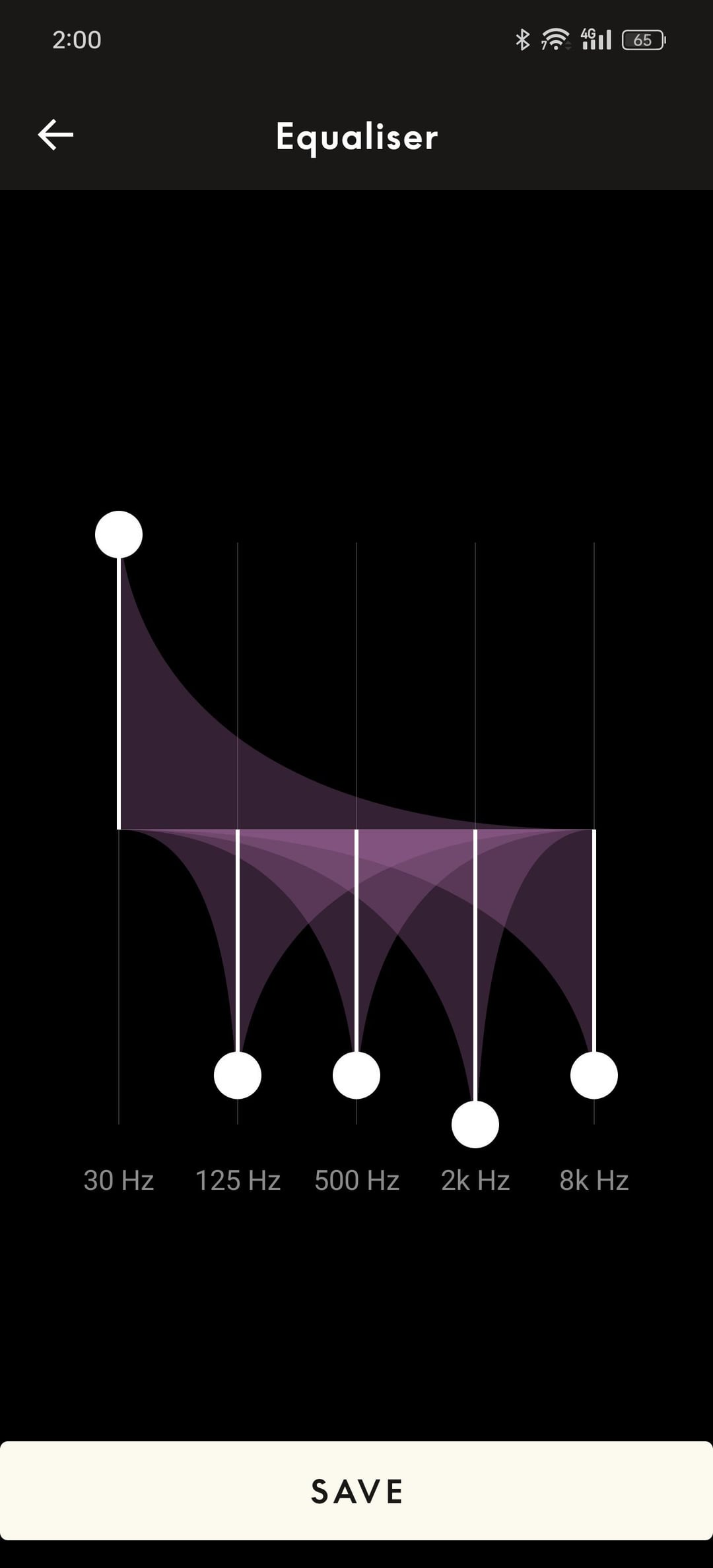
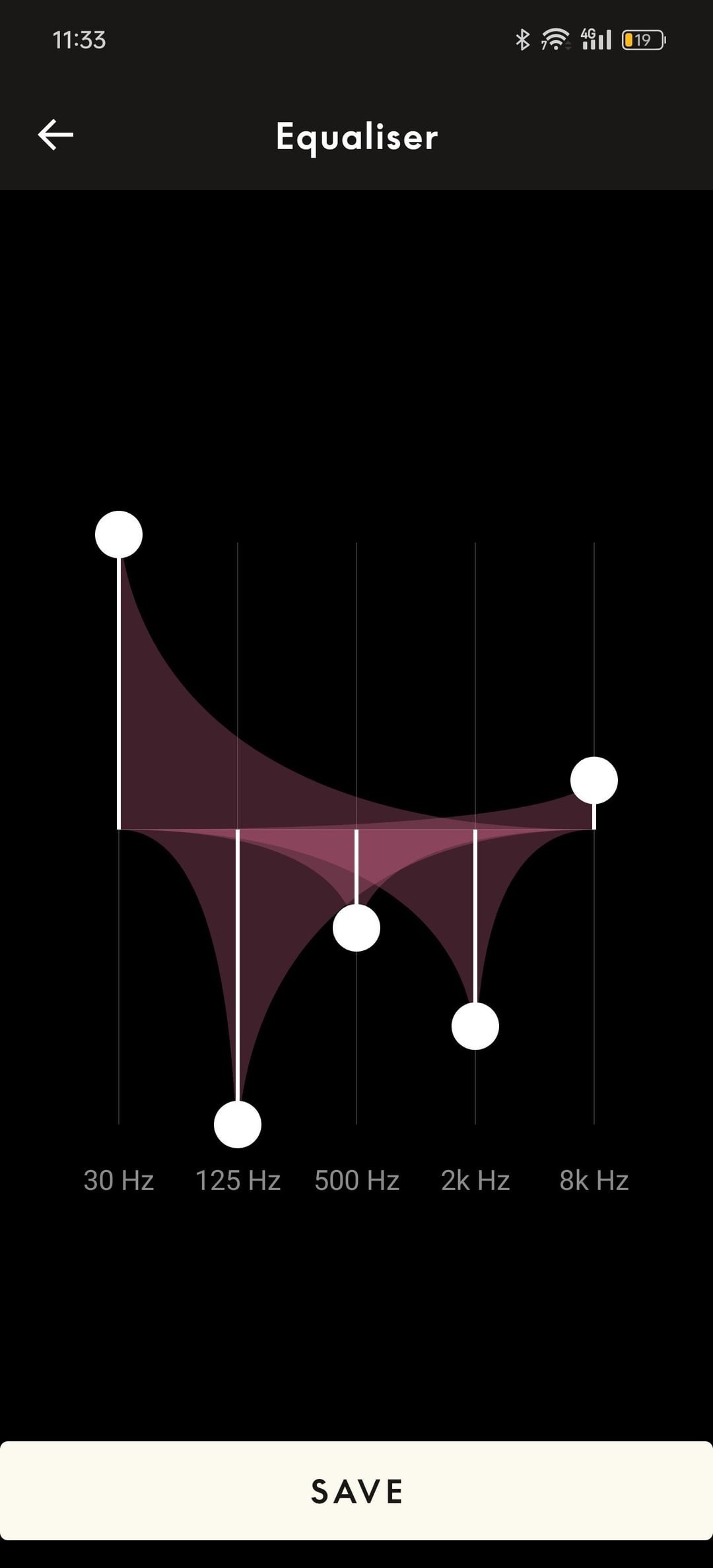
Xbox Users: To get a good eq for this platform was extremely hard. Not only is the sound quality reduced compared to the aptx adaptive when paired with an android phone or aac when paired with an apple device, but the factory eq was even worse for some reason(b&o/xbox really messed up) After testing and eq’ it, testing then eq’ing again for months, and comparing to frequency response graphs online as well as struggling with the extremely limited frequency bands in the Bang and Olufsen app, I have managed to only come up with 2 sets of eq’s to fit different use cases and couldn’t get 1 eq that fixed all our problems as there is simply not enough frequency bands for me to properly tune the sound. As you can see above, the Purple EQ graph I have ended up with will be the most pleasing and balanced sounding eq with super clean and tight bass without mudiness. It sounds perfect up to this point, HOWEVER a major downside to many people(doesn’t include me btw) is the much lowered max volume, which means u have to max out the volume dial to get about 75-80 decibels average volume which is more than enough for me and most people but may be too soft for some with hearing damage. Hence, when using this on Xbox, I suggest going with the Purple eq graph first as it will give you the best and most accurately tuned sound(using corrected frequency response graph), and if it’s too soft for you, continue reading and use my 2nd eq graph which is in red.
For the red eq graph, it will retain the original loudness, and massively increases bass and improves clarity WITH the added benefit of SPATIAL AUDIO! The way that it’s tuned, it will give the sensation of surround sound, exactly like apple’s spatial stereo feature, except that the beoplay portal lacks the feature that has head tracking, but the increased virtual soundstage is very noticeable compared to the factory eq or my purple eq graph. However, the downside of this eq is that higher frequencies like cymbals or bells may be uncomfortable after long periods of time if you play on high volume so please take care of your ears and lower/adjust the volume accordingly.
Android: Ok good news, for android users, your life is super easy and you don’t have to mess with anything to get wonderful sound out of your headphones. Step 1: Go to Playstore and download “Wavelet” (don’t worry it’s completely safe and legit with zero ads and is free to use forever, you don’t need to purchase premium, it’s useless for these headphones) Step 2: Go the app and press the on button at the bottom and accept all permissions it needs Step 3: Go to settings in the app and turn on this toggle called “legacy mode” Step 4: Connect your headphones to your phone via Bluetooth(skip this step if you already did this prior) Step 4: Turn on the “Auto EQ” toggle and click into that setting Step 5: Go to the search bar and search for “Beoplay Portal” and click on the search result Step 6: Enjoy your newly tuned rich sound with ass rumbling bass and clearer vocals than ever! (If you downloaded the bang and Olufsen app, make sure your sound setting is on “optimal”)
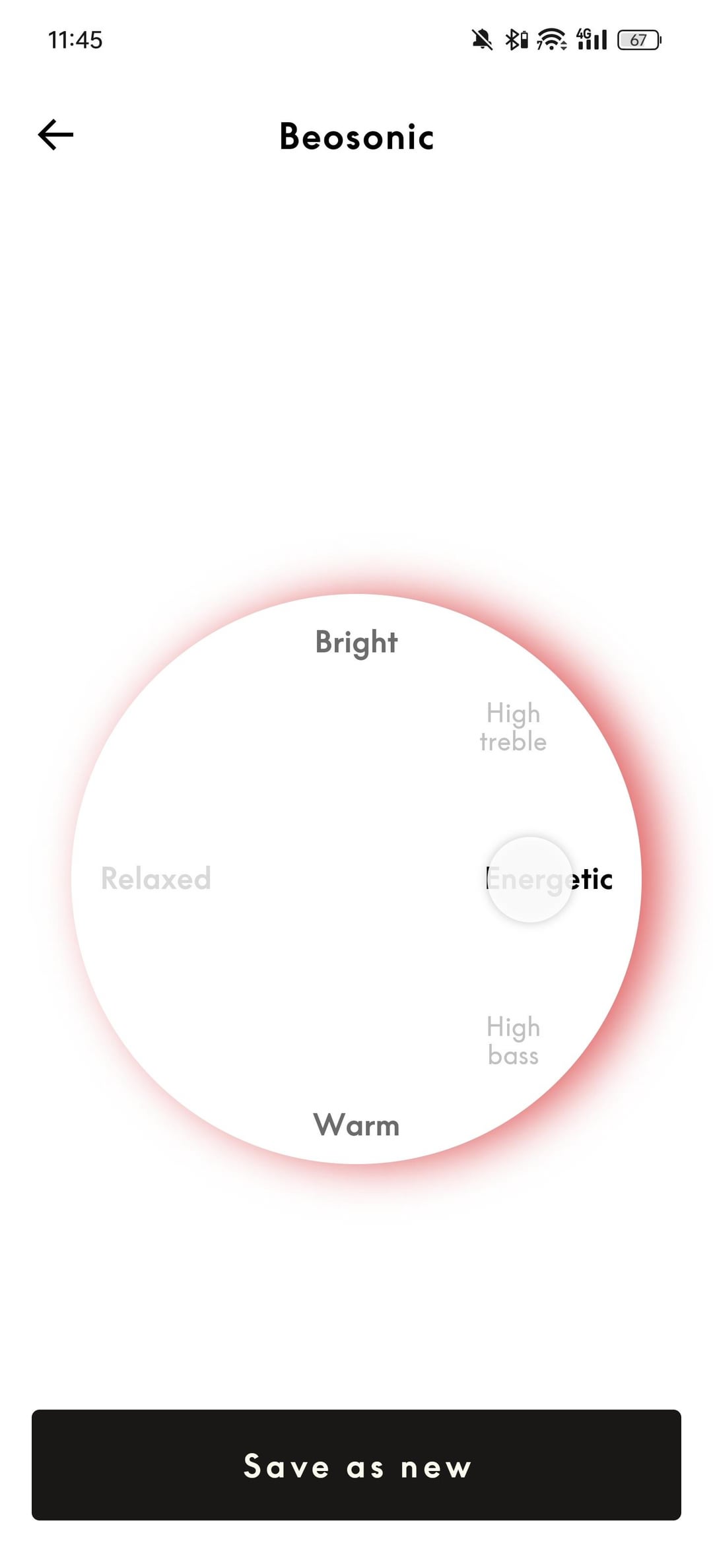
iPhone/Ipad: So basically Apple is being a jerk and doesn’t allow 3rd party apps to control your sound so you have to download the Bang and Olufsen app in App Store and after you go through the setup process, click on the bottom right part of the app where all the rectangular eq profiles are so you can configure a custom eq on the round dial. Pull that nipple to the exact same position shown as what I posted in this Reddit post(should be the last image with the white background). Now this won’t give you as well of an eq as wavelet on android, however it should drastically make your headphones sound much better with much cleaner bass and vocals
Pls share this with everybody as these headphones sound disappointing out of the box but with a little bit of help, these actually sound pretty decent but I still cannot justify the 500 dollar original msrp so I hope y’all get them on sale recently:) happy listening guys!!
Posted by Series_X_Pro