
First: there is no immediate danger and no reason to panic.
This mainly goes against the advice of leaving your console plugged in all the time to avoid NAND-corruption, but is generally true for all devices.
A little over a year ago, when "news" about the 160-0103 NAND corruption got much attention, I saw many people recommending leaving the console plugged in all the time, even when not used so the NAND can be "refreshed" and won't corrupt.
In this post I will go through what the problem is, why leaving it plugged in won't help and why it is actually harmful and what you should do instead.
NAND in this contect generally means NAND flash, which is one kind of flash. I will just use "flash" in the following.
The original Problem
To recap the problem in short: Flash storage works by trapping (or purging) a charge in an (isolated) floating gate of an transistor to either store a 0 or 1. While this is somewhat nonvolatile, it isn't forever. The isolation isn't perfect and the charge is leaking out over time. Depending on the exact flash model and factors like temperature the manufacturer might not even guarantee a year, but in general if the flash works correctly you can expect many years, especially with the type of flash used in the Wii U. In general the flash memories used by the Wii U still keep their data after 10+ years already. But there seems to be one or more bad badges of flash memory from hynix, which was used in some Wii Us, which looses the charge much more quickly and can therefore develop data corruption after a much shorter time. That then caused multiple problems like 160-0103 Error messages or freezes.
In case you are affected by this, we have multiple solutions to that problem now: https://gbatemp.net/threads/ultimate-wii-u-troubleshooting-guide-system-memory-error-160-0103-stuck-wii-u-screen-stuck-factory-reset-black-screen-after-stuck-update.642339/ (and none of the solutions is Voultars video, because I see that linked regularly)
Flash is not RAM
Now some people seem to confuse this with SRAM or DRAM. SRAM, needs a constant voltage applied to keep it's state. It can do this with very little current and is used for storing the BIOS settings on a PC for example. DRAM on the other hand stores the data as charge on a Capacitor connected to a transistor. The transistor losses the charge in a matter of milli seconds and also when it is read. Therefore every DRAM controller causes the DRAM to periodically rewrite the data. This uses much more current and is used for the main working memory on a PC or also the Wii U.
This might sound familiar to the floating gate of flash but without going into too much detail it is very different technological. The Timescales are different by multiple magnitudes, reading doesn't destroy the data
in a flash cell and writing to flash is a much ore expensive operation than on DRAM. Also the isolation of the floating gae wears down with every P/E Cycle (program/erase – what you would call writing), making it lose charge faster and eventually fail. So periodic rewrites aren't natural to flash.
Types of flash in the Wii U
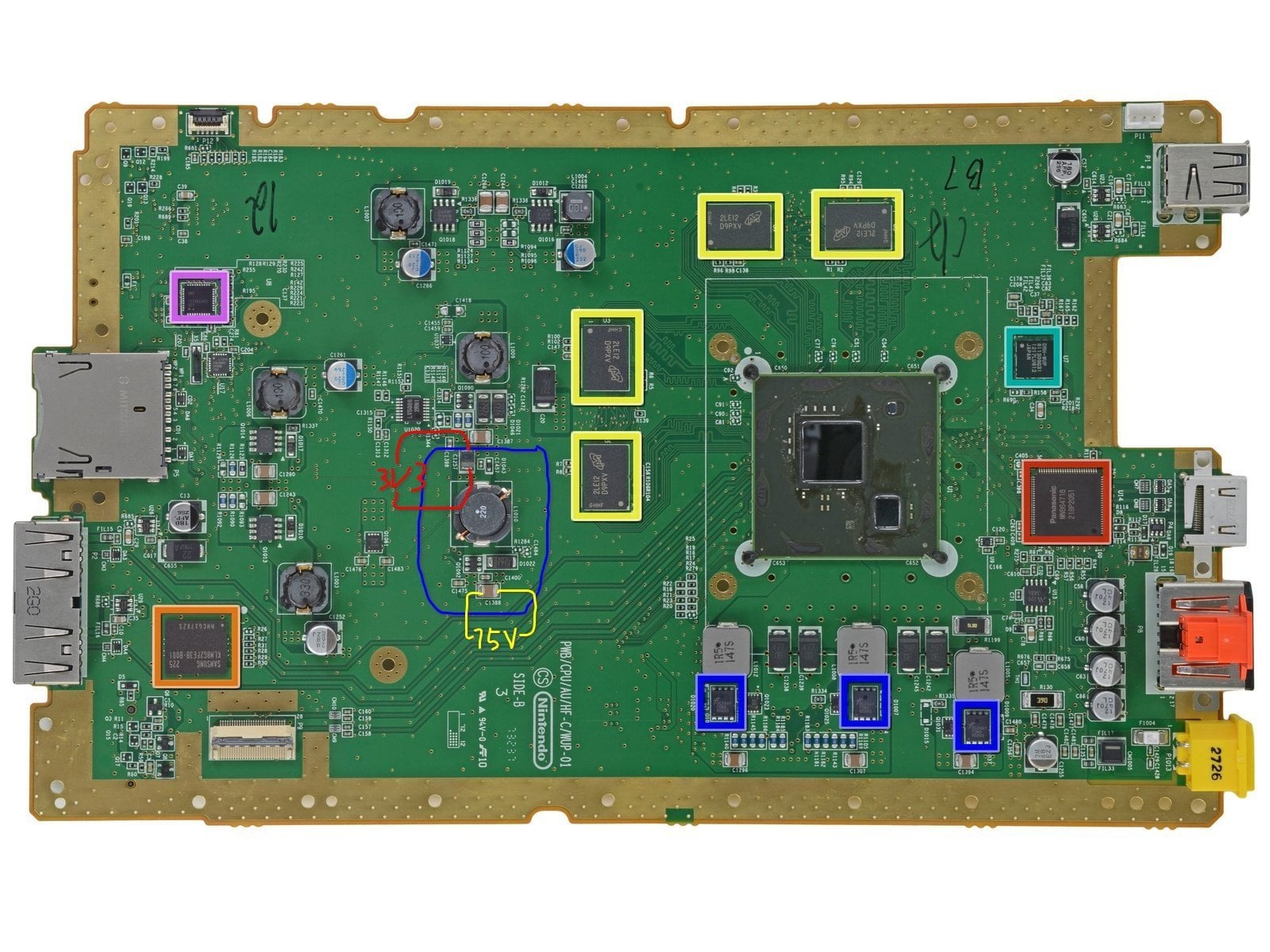
The Wii U doesn't just use one type of flash, but two, with different interfaces. First there is the eMMC. This is where all the userdata goes and it also holds most of the System titles. It has the size which is printed on the label on the console (8 or 32GB). The eMMC hardware consists of two basic components, the flash memory itself and a controller wich runs it's own embedded firmware. The Controller is responsible for managing the flash, doign bad block replacement, handeling the erase when data is rewriten, wear leveling, garbage collection, ECC and so on and presents a simple interface to the host (in this case the Wii U), which can just tell the controller to read or write some logical block. Since the firmware is embedded in the eMMC and not leaked yet, we don't know the details of the inner workings of the eMMC.
The eMMC is also called MLC. MLC stands for multi level cells, which means that one cell / the floating gate can not just be either charged or uncharged, but also has two states in between. That allows it to store two bits instead of one. This comes at a cost that reading and writing is more complex and therefore slower and it can only take something in the order of 10k P/E cycles. The Wii U os internally uses the name mlc, so that is how it is more commonly known.
The eMMC is what is going bad in these consoles.
The other flash the Wii U has is a raw flash chip. That means the Wii U talks to it on a much lower level and the OS of the Wii U is responsible for doing everything what the controller in the eMMC does. This chip only has 2x512MiB (one for Wii U, one for vWii). But it uses SLC flash, which can take arounf 100k writes. It holds the core of the Operating System and also a write cache for the MLC, presumably to prevent the eMMC from wearing out too fast from constant save game writes. Corruption on the SLC so far is very seldom and for some reason we only saw it on consoles which still had the 1.0 Firmware, so we ignore that here.
Error Correction (ECC)
Since flash isn't perfect it is used with an Error Correction Code (ECC). It stores a little bit of extra data, which can be used to detect and correct 1bit errors and detect, but not correct 2 bit errors.
Will the Battery keep the eMMC charged?
No. The Battery is only for the RTC (real time clock). It doesn't provide power to the eMMC, and if it would, it wouldn't last for a day. The console works perfectly without the battery and the only thing that will affect is the clock.
But if the Wii U is plugged in all the time, doesn't that allow the controller in the eMMC to do refreshes?
If the console is off (red LED) the eMMC isn't powered, it can't do anything. You can check with an multimeter.
But what about Standby Services / ECO mode?
If you enable standby services, the console will be in standby mode most of the time. That means the DRAM is still powered and refreshed, but the eMMC won't receive power.
But the console will wake upe shortly after it was shutdown and go into ECO mode (yellow LED) and then in the Interval you configured. In that mode the eMMC is powered. But to help with the corruption the eMMC internal controller would need to periodically read the whole Flash, look out for ECC correctable errors and rewrite that data. So far there is no evidence this is happening. Resarch done by GaryOderNichts suggests that the Hynix eMMCs have a problem which prevents them from running background tasks.
Also I now already had a few cases were the console was never really unplugged and the eMMC still developed problems. In one case https://gbatemp.net/threads/how-to-set-up-isfshax.642258/post-10433676 we even have evidence that the standby services were active all the time, since the SLC was already worn out from it, which brings us to the problems…
Why is it bad to leave the console plugged in?
If the console is plugged in all the time, the components that are powered all the time will wear out and fail at some point. If standby stuff is disabled, that would be the Power Brick, The internal 3V3SB voltage converter, which powers the read LED, the SMC and the Wireless Adapters, waiting to be woken up a controller.
The Power supply has capacitors which wear out. We already had a few (but not that many) 3V3SB converters fail, and the Bluetooth adapters also seem to fail for enough people also a few 5Ghz Wifi Modules (the one for the Gamepad) failed or degraded.
If in addition to that Standby Services are activated, the DRAM will also be powered and refreshed all the time, which can make it fail. The other things are releativly easy to repair with spare parts but replacing a DRAM is a whole other level. Also console will wake up and boot a little bit and do some stuff, this will cause writes on the SLC. If the SLC is totally worn out the console is completely bricked. In the case mentioned before the superblocks already had 120K P/E cycles, which is 20% beyond the design life. All superblocks had already hard 1 bit ECC errors.
So what should I do?
If you use Standby Services (which is required fo the Quickstart Menu on the Gamepad), set the interval to 24h. The default is 1h, but there is no point in the Wii U checking every hour for new updates and stuff.
Unplug the Wii U if you don't plan to use it for an extended period. Ideally you would just have a power strip with a switch to disconnect all your electronic devices if you don't use them. But there is no reason to panic and unplug the console if you don't use it for 5 minutes. And this generally goes for all electronic devices…
But I am afraid of bad NAND
First of all if you don't experienced problems yet, your console is mostly fine. If it doesn't have a Hynix chip (you can check with Wii U Ident) you are pretty safe. But even if you havea Hynix and use it for a little bit and non't notice problems, you are likely fine. Just use your console and don't worry.
If you really want an extra layer of protection or you already experience problems, you can install ISFShax.
It won't stop the corruption from happening, but it runs early enough that even if the whole eMMC goes bad, you can still reinstall the system or use the SD in the front slot with redNAND as a replacement for the bad eMMC.
Posted by unbrickU
2 Comments
Thanks for posting this. I’ve always doubted the claim that leaving the console powered helps avoid corruption.
The biggest reason for this, which you alluded to in the *Flash is not RAM* section, is that FLASH can only be set to 0 bitwise and can only be set to 1 by erasing a large chunk of memory at once. This means that to refresh the FLASH, the controller would need to erase a large chunk of memory before re-writing the data, which will eat into the number of write cycles possible before it wears out.
Thank you, very good stuff! This should be a pinned post on this sub!