
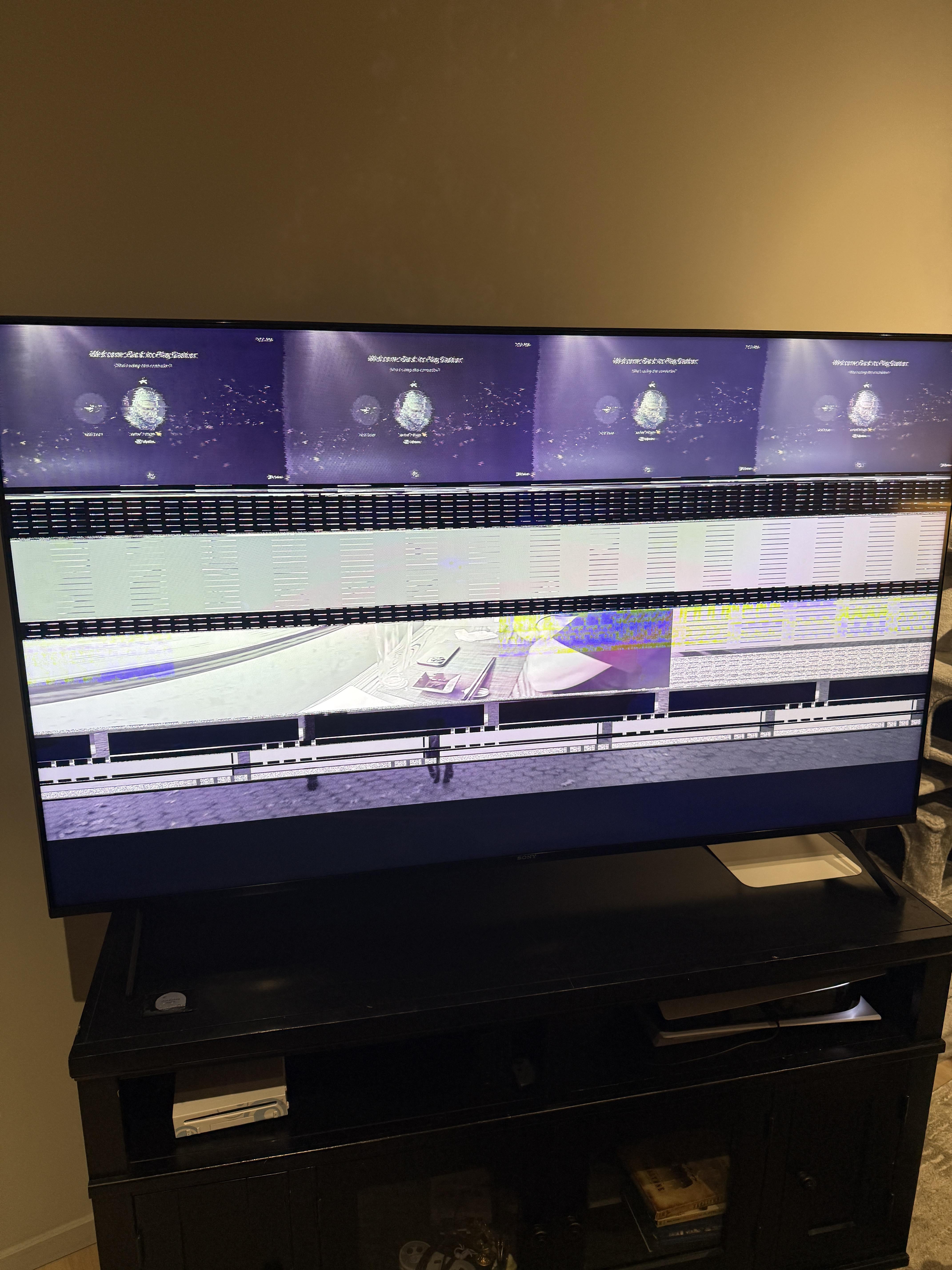
The last time I used it I was watching a blu ray. I tried turning off the PS5 completely, and then switching hdmi cables. The TV itself works fine while using apps, or watching live TV. I have currently unplugged the PS5 and am waiting at least 20 mins before plugging it back in.
Posted by extrajuicyj520
5 Comments
I’m no expert but it’s likely your hdmi port is done for. First thing you can do is swap out the cable and hope that’s the issue and not the port. If you get the same results then you’re looking at an hdmi port replacement. This is a surprisingly common issue and many places have the fix price on their display windows, $100.
Try the ps5 on another TV. It could be a faulty hdmi port. Could be something a lot worse
Unplug the hdmi 😔😔
Yeah, try another HDMI cord. Don’t cheap out buy a real quality cord.
If it’s the same. Try a different tv.
A little tidbit. I wouldn’t have my PS5 in such a location. Mind is in an open space. Also installed a better vent since I didn’t agree with the factory vents.
I think my friend stock PS5 had a few issues during the time we’ve had ours. But I kept telling him to clean it. Since he has his in a cubby as well.
If your TV supports HDMI 2.1, make sure it’s still enabled for that port. I had my TV revert the “enhanced HDMI” option once after an update.