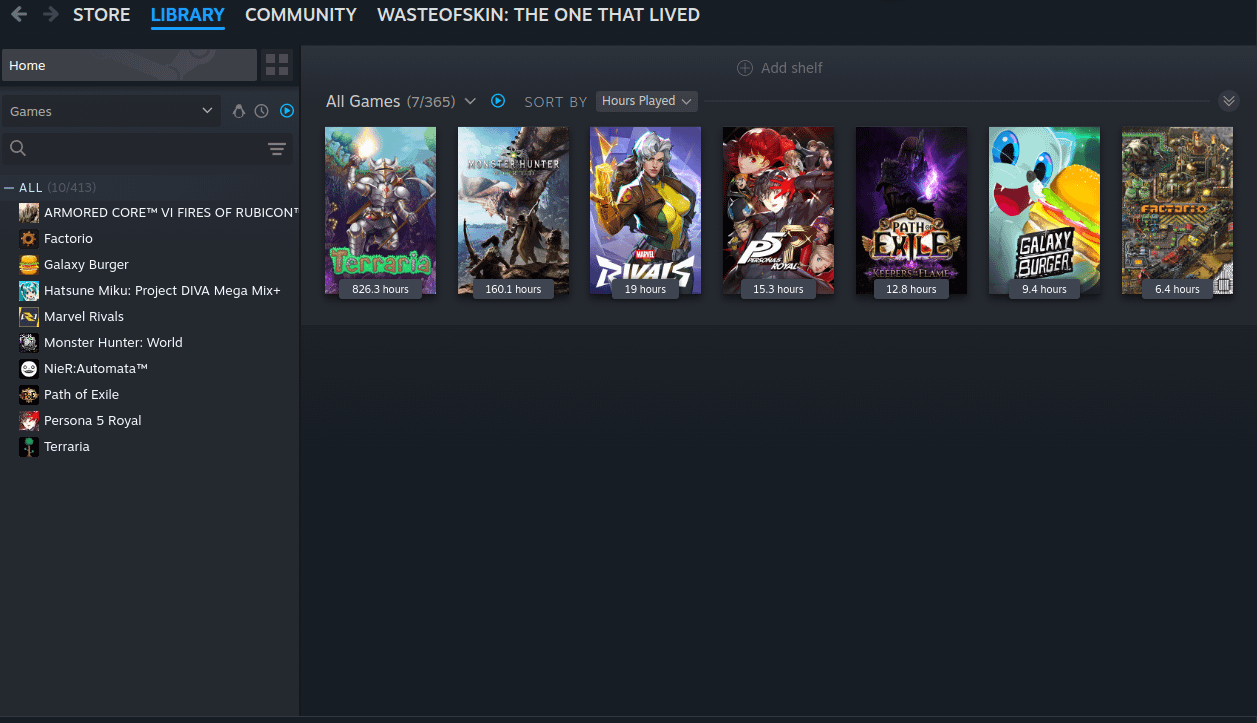
bro there’s a list on the left, under “all”. You’ll see it if you look closer
Kitej67 on
On the top left > “View” > Small Mode.
It will hide the store and everything, but if you only are looking for the list, from what I believe that is the only way. You can get back to normal / large mode anytime tho
MadD_08 on
But there’s a list. It is on the left side of the screenshot.
(Bad joke, but I could not resist)
Strydhaizer on
Click that dropdown icon (right before that bright blue play icon/sort by) above your grid library then click Remove Shelf.

5 Comments
bro there’s a list on the left, under “all”. You’ll see it if you look closer
On the top left > “View” > Small Mode.
It will hide the store and everything, but if you only are looking for the list, from what I believe that is the only way. You can get back to normal / large mode anytime tho
But there’s a list. It is on the left side of the screenshot.
(Bad joke, but I could not resist)
Click that dropdown icon (right before that bright blue play icon/sort by) above your grid library then click Remove Shelf.
Click on a game and the grid will go away