
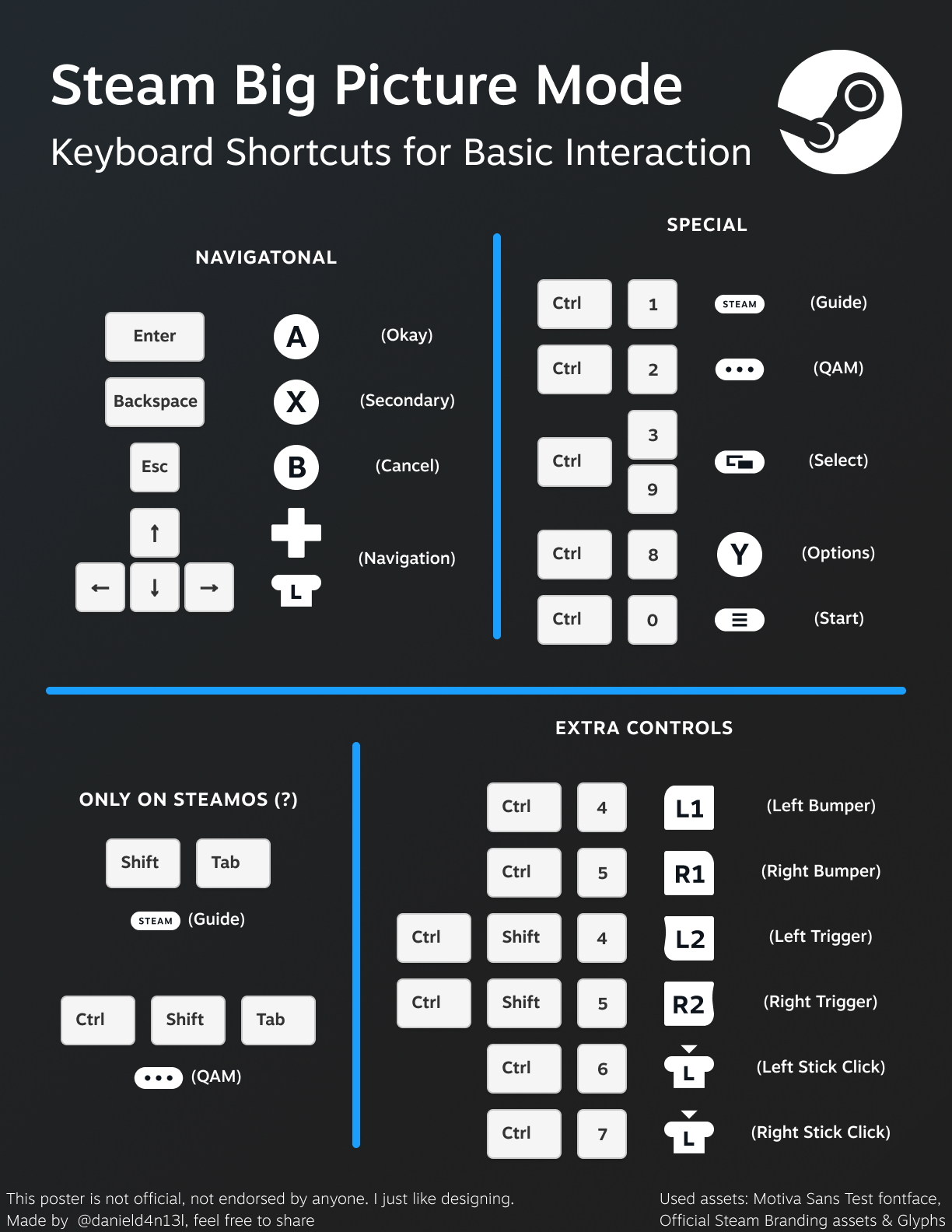
tl;dr: Gamepad buttons are mapped to `Ctrl`+`number row` according to picture.
I really like Steam's BPM both on my TV/HTPC and my casual PC. However, it always bothered me that the displayed buttons to navigate the BPM interface are (of course) gamepad buttons – even when no gamepad is actively used, forcing the user to click the interface element when only keyboard+mouse are present.
I wanted to know if keyboard shortcuts existed that mimic gamepad buttons. After searching many times through this sub and other places, I stumbled actoss a post that showed `Ctrl`+`1` and `Ctrl`+`2` for "Steam" and "Quick Access", so I went into Steam's dev chromium devtools, and found the "TranslateKey()" func that perfectly does the job.
And so I made a pic guide for the shortcuts using Steam's assets, and I wanted to share.
Posted by danield4n13l