


Hey guys,
I'm looking for a helping hand with a Steam Stream issue. The goal is to stream from my home desktop to my laptop, in 1440, 60 or 30fps, specs below. I haven't had any issues setting up a successful connection between the two using Steam Stream, the issue is frame output on the host machine. I decided to use Arc as my test game (goal is to play Split Fiction remotely), fortunately Arc gave me some good performance intel.
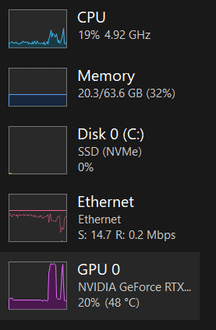
When I run Arc without the Steam Stream my frametime on the host is 6ms, I play on this all the time and all values are looking good. As soon as I connect to Steam Stream the overall frametime on the host jumps to 33ms as well as the cpu frametime and both stay there, very consistently. System resource utilization is under 25% for both the CPU and GPU. If the game runs slow on the host, it's not going to be great downstream.
Interestingly, if I run TeamViewer, the frametime remains stable at the original, low, values although that's not the right tool for the job. I should note, both of the systems are running on the same (good) router with the host machine on ethernet and the laptop on wifi. Also, before anyone brings it up, I tinkered with Moonlight and Sunshine last night but stopped short of port forwarding and would like to use Steam if possible.
I've tried the following solutions:
- Locking display resolution on the host and client, 1440p, 1080p, as well as 60/30fps limit
- Allowing Steam to negotiate the settings on its own
- Disabling the iGPU
- Disabling overlays
- Toggling various hardware encoder and other settings in Steam Stream
- Verified Arc application isn't setup for any frame limit cap
- Setting Nvidia GPU global power management setting to maximum performance and assigning Steam.exe app to use the global setting
- AI troubleshooting, chatgpt & gemini
- Windows 11 & BIOS power management set to performance values
- Drivers and BIOS up to date on both systems
- No resource hogs running on either
Desktop Host Hardware:
- Ryzen7 9800X3D
- Rog Strix x870E-E MB
- TUF Gaming RTX 5090
- 64GB Tforce Delta 6400mhz
- 2 TB Samsung 990 Pro
Laptop Client Hardware:
- HP Spectre x360 2-in-1 Laptop
- Intel i7-1335U
- Intel Iris Xe Graphics (iGPU)
- 16GB 4200mhz
- 1TB WD SSD
Do you have any suggestions on what I should try? Appreciate any help you can provide!
Thanks,
-Willie
Posted by WillieBeam1n