How are you even able to check for Stick Drift on the dualsense controller? I have been wanting to do that myself but don’t know how
Lazzyie on
That’s normal for a stock dualsense for circularity, what you need to look for is when the controller is first plugged in on the GitHub and the sticks are neutral do they move on their own? That is drift, you can try to clean the potentiometers but it’s only a temporary fix, at that point they can be replaced with hall effect or TMR sticks for a longer lasting fix.
Rocklight124 on
I just buy a controller (Same Color) from Walmart and return my old controller later. These controllers can go months without stick drift and then you buy a new controller and bam! Stick drift after 3 weeeks.
KaveyXX on
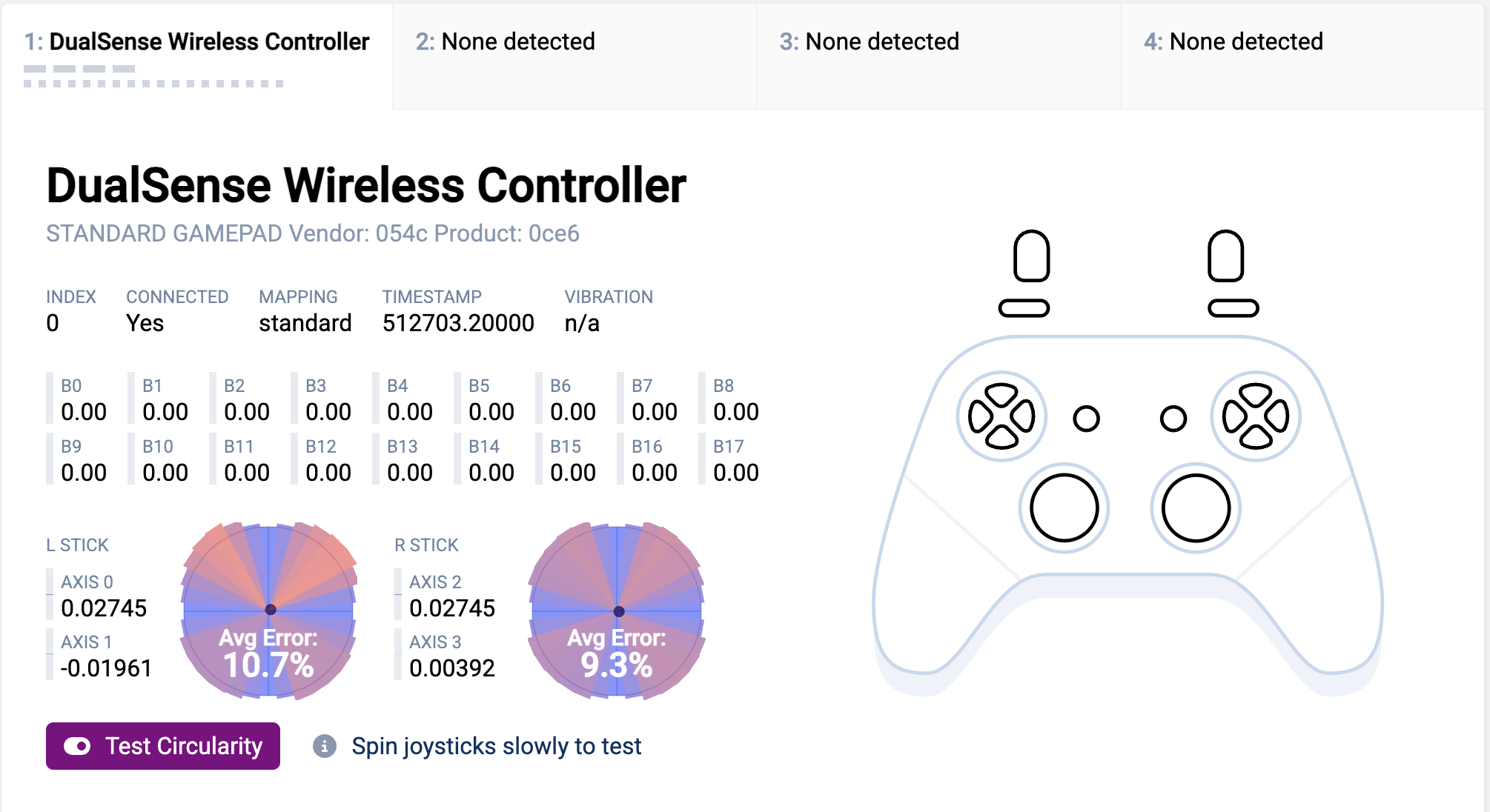
That’s a pretty average level of circularity, the general best minimum is around 8%, so you are only within a couple of %. The reason they are slightly square is to ensure you get fuller range in diagonal movement. if the circularity was perfect at 0%, then any diagonal would only be at 70% each axis which could make some movements feel slower when moving diagonally.
My circularity on my DualSense is about 9% on both.
However circularity doesn’t indicate stick drift, that’s based on the readings from the centre position (when the sticks are left untouched and centred) and the readings are skewed to one side.
These are my readings for centre. I’ve calibrated mine so my neutral is 0.00392 in all directions, though normal is 0.01 to up to around 0.02, above 0.05 is where you need to worry about stick drift as that’s then getting above the 5% range which most games will allow for due to default deadzone.

4 Comments
How are you even able to check for Stick Drift on the dualsense controller? I have been wanting to do that myself but don’t know how
That’s normal for a stock dualsense for circularity, what you need to look for is when the controller is first plugged in on the GitHub and the sticks are neutral do they move on their own? That is drift, you can try to clean the potentiometers but it’s only a temporary fix, at that point they can be replaced with hall effect or TMR sticks for a longer lasting fix.
I just buy a controller (Same Color) from Walmart and return my old controller later. These controllers can go months without stick drift and then you buy a new controller and bam! Stick drift after 3 weeeks.
That’s a pretty average level of circularity, the general best minimum is around 8%, so you are only within a couple of %. The reason they are slightly square is to ensure you get fuller range in diagonal movement. if the circularity was perfect at 0%, then any diagonal would only be at 70% each axis which could make some movements feel slower when moving diagonally.
My circularity on my DualSense is about 9% on both.
However circularity doesn’t indicate stick drift, that’s based on the readings from the centre position (when the sticks are left untouched and centred) and the readings are skewed to one side.
https://preview.redd.it/1mrhytjy8sug1.png?width=1407&format=png&auto=webp&s=4a118d9d0a1eea53032badcdc37b20d1c96795b0
These are my readings for centre. I’ve calibrated mine so my neutral is 0.00392 in all directions, though normal is 0.01 to up to around 0.02, above 0.05 is where you need to worry about stick drift as that’s then getting above the 5% range which most games will allow for due to default deadzone.