Takes 2 seconds to click on all the titles to update
Also, there’s an automatic update setting.
MestreToto on
This will never happen again, they removed this button for a reason
Traumwelt on
Why do you need this? Steam automatically prioritizes updates for games you play frequently. The “Update All” button has been removed to reduce server load. Let Steam manage the updates.
jezhayes on
I’m pretty sure the weird update schedule has more to do with managing Valves bandwidth and not your bandwidth.
KriegsKuh on
do you really need to update all of these games at the same time?
QuantumGrain on
Allow me to sort from smallest to largest updates too
Scrutster on
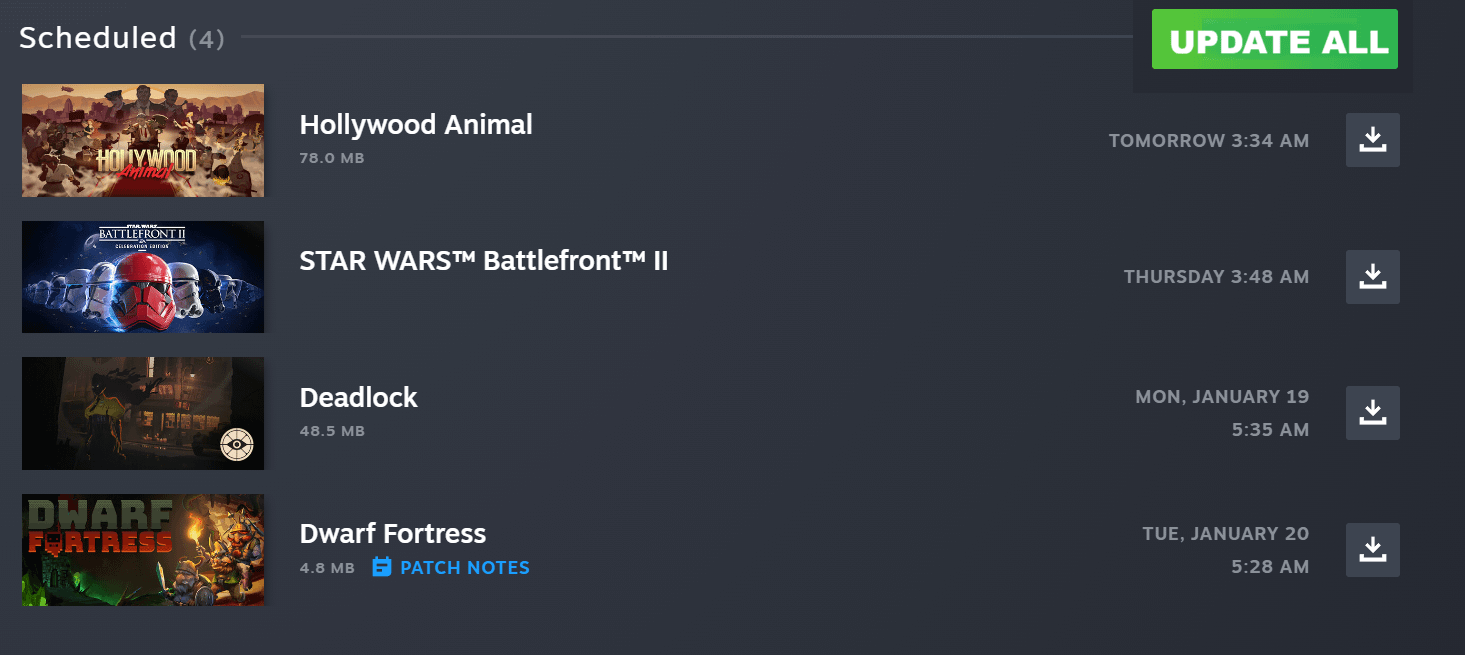
Just throwing this out there..right above that “Scheduled” tab is the “Up Next” tab. Move the scheduled ones into that and poof. There’s your update all.
Old-Recognition165 on
Can we also have a do not update button for offline games that break itself with new updates *cough*Bethesda*cough*
FoolzRailer on
Clearly a difference between people who hate having a number icon on an app or 100 unread messages in inbox and people who have to have it clean all the time. I always manually update everything every time I start Steam, so an update all would be nice, but not s must have.
suspiciously_true on
You can go into your Library mark all your games (click on the top one and than shift-click on the bottom one) than right-click one one game and you have an update all button.
SynapticStatic on
One thing you can do is as you install games, just right click -> properties -> updates -> set automatic to “immediately download updates”
_Goin_In_Dry_ on
How is Battlefront 2 in 2026?
Deletinglaterlmao on
Can someone explain to be why battlefront 2 has a five second update every month
Sydanyo on
How about make Steam actually respect the settings and stop scheduling updates when all the games in the library are set to update only when launching.
That’d be swell.
OmiOmega1 on
I want an option to sort the updates by size
GuyPierced on
You know those update will start by themselves, or when you launch the game. Usually off peak hours, so it’s cheaper.
AdorableSurround1019 on
Christmas 2026 is a year from now
Jokkitch on
Say you don’t understand server load without saying it
Adventurous-Cry-7462 on
You dont need to update every game constantly, you’re most likely not even playing them
andyruler10 on
If you play them regularly set them as high priority for updates, they will always auto queue the updates as soon as they come out.
MerchantChief on
I want a buy all games on sale on my wishlist button.
Datdudecorks on
I swear before the library changed there was one
ftgyhujikolp on
And please allow us to update everything simultaneously
WhiteRhinoPSO on
I have dozens of games installed “just in case,” some because I keep thinking about playing them and some because they’re really big and my connection sucks.
I rarely have more than one game needing an update a day. Just how many updates do you have waiting in a row that this would be a worthwhile change?
NoLoggingOnMe on
you can manually set your games to priority download as soon as possibles in the settings (one by one unfortunately) and also say you allow background download. I never have to click anymore. as soon as an update is available it does it
Amazing-Ish on
I just wish they put a “download next” or “add to download queue”, so i can have my current download continue instead of pausing that and starting a new one halfway through
AccordingBathroom484 on
Just click download ok each item, it adds it to a queue.

28 Comments
Is there not just an automatic update setting?
Takes 2 seconds to click on all the titles to update
Also, there’s an automatic update setting.
This will never happen again, they removed this button for a reason
Why do you need this? Steam automatically prioritizes updates for games you play frequently. The “Update All” button has been removed to reduce server load. Let Steam manage the updates.
I’m pretty sure the weird update schedule has more to do with managing Valves bandwidth and not your bandwidth.
do you really need to update all of these games at the same time?
Allow me to sort from smallest to largest updates too
Just throwing this out there..right above that “Scheduled” tab is the “Up Next” tab. Move the scheduled ones into that and poof. There’s your update all.
Can we also have a do not update button for offline games that break itself with new updates *cough*Bethesda*cough*
Clearly a difference between people who hate having a number icon on an app or 100 unread messages in inbox and people who have to have it clean all the time. I always manually update everything every time I start Steam, so an update all would be nice, but not s must have.
You can go into your Library mark all your games (click on the top one and than shift-click on the bottom one) than right-click one one game and you have an update all button.
One thing you can do is as you install games, just right click -> properties -> updates -> set automatic to “immediately download updates”
How is Battlefront 2 in 2026?
Can someone explain to be why battlefront 2 has a five second update every month
How about make Steam actually respect the settings and stop scheduling updates when all the games in the library are set to update only when launching.
That’d be swell.
I want an option to sort the updates by size
You know those update will start by themselves, or when you launch the game. Usually off peak hours, so it’s cheaper.
Christmas 2026 is a year from now
Say you don’t understand server load without saying it
You dont need to update every game constantly, you’re most likely not even playing them
If you play them regularly set them as high priority for updates, they will always auto queue the updates as soon as they come out.
I want a buy all games on sale on my wishlist button.
I swear before the library changed there was one
And please allow us to update everything simultaneously
I have dozens of games installed “just in case,” some because I keep thinking about playing them and some because they’re really big and my connection sucks.
I rarely have more than one game needing an update a day. Just how many updates do you have waiting in a row that this would be a worthwhile change?
you can manually set your games to priority download as soon as possibles in the settings (one by one unfortunately) and also say you allow background download. I never have to click anymore. as soon as an update is available it does it
I just wish they put a “download next” or “add to download queue”, so i can have my current download continue instead of pausing that and starting a new one halfway through
Just click download ok each item, it adds it to a queue.