
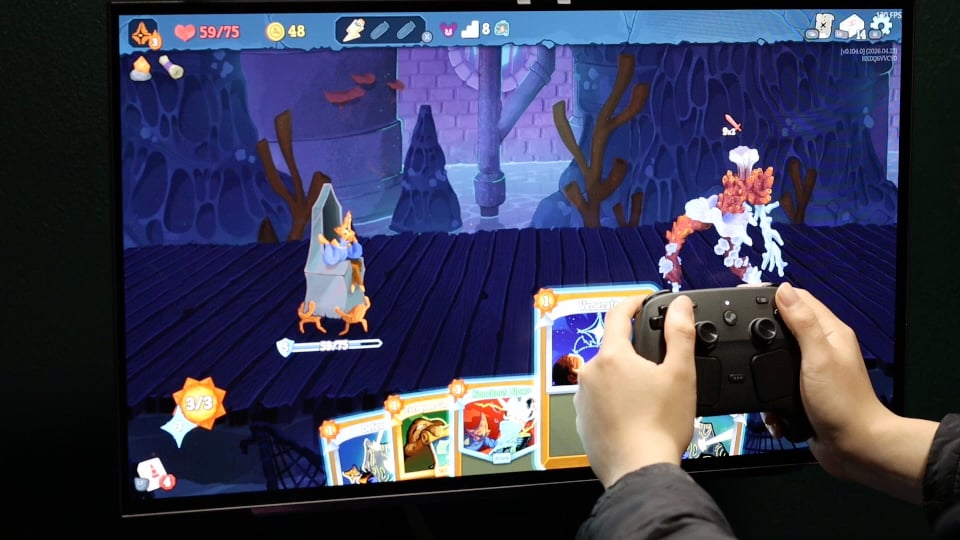
Hey y'all, I was lucky enough to get the controller yesterday like some fellow californians and figured I'd test out some configs. Some of this you could do on the steam deck of course but I also tried to use the grips where it made sense. This was just a couple ideas I had already and a couple I came up with but I know I'm just scratching the surface. Also if people are interested I'm happy to record more, if so let me know what other ideas I could do. Here's some details for the set ups (right and left grip refer to the capacitive sensors):
1) On Slay the Spire I set up Left Grip* to pull up my deck, and Right Grip to pull up my discard pile. I also inverted the input so it worked on release, later on (as you can see in the SB config I figured out an even better trick which is to bind the command on release and add an extra of the same command on press so it's only active while you do the input, or remove it if inverted). In this case that would've auto backed me out from the deck/discard once I grabbed the controller again.
2) In Paccarat I set up the Left Trackpad to be a horizontal mouse region** [if you are a valve employee please scroll to the bottom of the post] on the bottom middle area to quickly scroll through the cards in my hand (this feels very good because the trackpad is very accurate and only covers a small area so I can flip through instantly or very slowly with a lot of precision), then I set up the SAME trackpad to become a normal mouse when I release the Left Grip so you can hover for info anywhere on the screen. You can accomplish this by using a mode shift.
3) Hacking in Pragmata with the trackpad. This is something I've been wanting to try for a while and I'm happy to report it felt great once I had my sensitivity dialed in. Don't make it too fast or it's almost too easy but imo it feels more immersive and significantly better than using the face buttons. Unfortunately the game doesn't handle MnK + Gamepad inputs simultaneously very well so I had to use an MnK template (to move while hacking), but fortunately it felt great and I couldn't really tell a difference besides the glyphs switching over (I did also rebind other inputs back to gamepad to minimize that though).
4) Media Controls in game in Crimson Desert. A simple radial menu with Play/Prev/Next (thought of adding volume control as well later), and an Alt+Tab to switch to my music app, I would've preferred desktop switching but I couldn't figure out how to get the windows button working properly. Once on the music app the config switches to desktop controls, I played with an alt-tab there as well but I found it easier to just click on the game since I was using the default trackpad as a mouse to navigate music selection anyways.
5) In Stellar Blade's photo mode I bound the camera to move directionally on the right trackpad, and then on release of the Left Grip to pan instead (I found the ergonomics of using a trackpad on one side and releasing the grip on the other side much better). My favorite feature I added here, using the trick I previously described in my slay the spire config, was that whenever I was touching the track pad to manipulate the camera the UI would auto hide).
*capacitive grip sensitivity doesn't currently seem to be live but we know it exists because at least one reviewer has posted a picture of the screen
**PLEASE add back the display hud option to make setting these up easier, took me forever. Also while I'm at it switching apps on windows makes the controller go haywire sometimes in big picture mode. Some of the bindings also keep reverting, I noticed it most in crimson desert where I already previously had a config for my xbox elite controller, it also happened with my desktop controls config.
Posted by D13_Phantom
6 Comments
We need more videos like this.
I loved the OG Steam controller. This one is even better, and the possbilities are endless. Long live the king.
The trackpads will be a key feature in Valve’s next game if they ever make one
This is exactly what the people need. I want to see more gyro aiming though.
I’m also bummed because I tried for a full hour straight right at launch and couldn’t get one 😞
How is holding it? I feel like trying to get from joy stick to trackpad could be a pain
In the steam deck the controls are the same and got bored because I use moonlight around house in OLED screens or phone, those actions I use the dual sense controller, the track pad and gyro can achieve the same plus Adaptive trigger and 4 sync devices, this video shows I did the right to keep using the dual sense.